Cheap (but not as cheap as SIYOTEAM products) memory card reader branded/sold as Modecom CR-202.
Package contains CD ROM with drivers (fortunately needed for SIM reader only) and reader itself.
Black glossy package - seems nice.
If I could choose I would prefer typical USB - mini/micro USB cable (even short like bundled with sansa clip than this one integrated and even shorted cable.
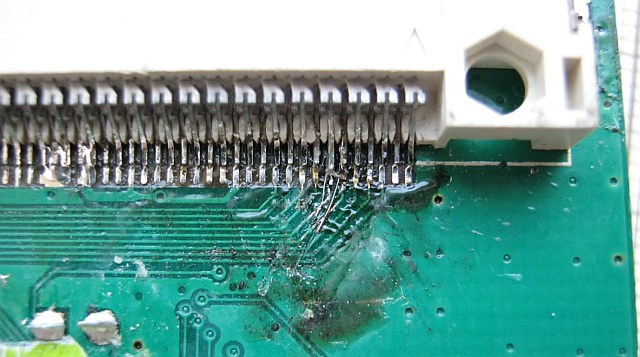
Soldering quality is pretty bad in this unit - as if half of the board was manually assembled (and no one cared to clean the flux).
Silkscreen shows real name of this reader: C2110 or G-C2110, probably manufactured by CDR-KING or cloned from it. Some speed tests.
Chip: Realtek RTS5161
The other side of PCB looks even worse.
Apparently this unit needed some fixing. Normally I wouldn't care, but this soldering looks quite unprofessional - two lines are shorted together, so Compact Flash reader probably would not work (don't have any CF card to check, but it seems unlikely that these connections would be redundant).
QC sticker is slightly torn, does the torn part represent part of device that is not working?
2012-08-11
2012-08-03
Cheap LED and incandescent light bulb comparison
In a hope for cutting electical energy bill a little and for test purposes I've bought recently few cheap ($7 including taxes) LED lamps. They are direct replacement for 230V E27 and E14 light bulbs. They are produced (or distributed?) by TelForceOne, known in Poland for cellular phones batteries and other accessories and branded as forever light.
Declared parameters:
Here is quick comparison of light generated by 60W incandescent bulb and LED lamp. Each set is made with same time/aperture/ISO set (but these settings are for comparison purpose only). Unfortunately I forgot to switch white balance to manual, so these photos could not help with comparing light spectrum.
60W incandescent bulb:
LED:
Difference in light angle is clearly visible above.
40W incandescent light bulb (E14, matte) vs LED lamp:
40W incandescent:
Declared parameters:
- 24 LEDs SMD5050 (easiest to verify)
- 370 lm light stream
- 50000 hours lifetime
- weight: 80g - they seem heavy (especially considering small size) and solid indeed, white collar is made of ceramic material, bulb is made of glass (or at least very similar material)
- 120 degree light angle (solid angle units in description would be more proper but less comprehensible)
- 5W power consumption
- intended to replace 40W incandescent light bulb
Here is quick comparison of light generated by 60W incandescent bulb and LED lamp. Each set is made with same time/aperture/ISO set (but these settings are for comparison purpose only). Unfortunately I forgot to switch white balance to manual, so these photos could not help with comparing light spectrum.
60W incandescent bulb:
40W incandescent light bulb (E14, matte) vs LED lamp:
40W incandescent:
LED:
In my personal perception I would rate these LED lamps slightly lower that as 40 W incandescent light bulb replacement. That may be effect of narrow angle though, single LED lamp with narrow angle could not illuminate room in a similar way that traditional bulb does, there is high contrast between front and back side of LED lamp and in general I think they are worth a try - I'm going to use them in combination with "normal" bulbs.
Of course they can not get hot, but they can reach moderate temperature - I would suppose that 1-2 W is dissipated as heat.
Direct photos of LEDs at work:
While taking last photos I was clearly seeing flickering on camera screen. Light flickering is not visible by naked eye, but I recorded it with oscilloscope using (oh irony) LED as a photosensor/photogenerator:
Flickering is clearly visible and it's frequency is 100 Hz. GND level is in the middle and this is DC coupling, so flickering variation is nearly 100% of maximum output. I assume that these lamps are not using any DC/DC converter (which may be a plus when considering expected lifetime), but LEDs are connected in series and driven directly by full bridge with some current limiter. Flickering may be another reason for using these lamps in combination with traditional incandescent bulbs. If you're interested - with same method no flickering is recorded when using incandescent bulb.
2012-07-21
Teardown & review: A4Tech X-710 mouse
Inexpensive optical "gaming grade" mouse bought in 2006 (thus used for 6 years).
400/600/800/1000 dpi sensitivity, switchable while working and without driver needed.
Microcontroller: Elan EM78M611, 8-bit RISC with built-in USB low speed device. 6k x 13 bit program memory (1k erase cycles), 144 B SRAM, 4B (yes, 4 bytes!) EEPROM (4 k erase cycles), 24-channel 10 bit ADC. This microcontroller is dedicated for USB mice, keyboard and gaming controllers - one of it's features is automatic PS/2 / USB port detection allowing to use cheap passive USB to PS2 connector.
Most likely EEPROM is used to store selected by user dpi setting - I wonder if settings are stored each time they are changed by user what could cause problems with EEPROM life time.
400/600/800/1000 dpi sensitivity, switchable while working and without driver needed.
Markings inside suggest that other mice from serie (X-708 to X-718) share same parts.
Steel 23 g weight (with X-708 mark).
It's little disappointing that only main switches (left and right button) are from OMRON.
Middle mouse button comes from Trantek Electronics.
After few years of usage both OMRON switches work flawlessly, but TTC switch had some problems as it was started to generate double clicks each time. Few drops of cleaning agent helped. Be careful and make sure it is dried before disassembling because mouse wheel (transparent plastic element) is not resistant to organic solvents.
Second problem (very common) comes from rotary mechanical switch that causes weird jumps when scrolling. Again, cleaning with organic solvents eliminates the problem (but it reappears after about 6 months, so this is not permanent solution). On the plus side mouse is easy to open and reassemble (no latches) so cleaning is quite fast. Petroleum jelly may work too and probably is safer to use.
Omron D2FC-F-7N are working reliably for me. In case of problem nice thing is they are serviceable: http://www.overclockers.com/forums/showthread.php?t=594646.
Optical sensor: Agilent ADNS-3060. According to datasheet it has selectable 400dpi / 800 dpi resolution, so I would suppose that other resolutions (including highest 1000 dpi) are interpolated. It seems to be common practice and some newer A4Tech mice (X-705, X-755, X-760, AK-47) share same sensor and their resolutions from 1000 dpi do 2000 dpi are interpolated.
It seems that X-718 and X-710 share same PCB, so some modding may be possible. "Upgrading" to X-718 would require either some simple PCB modification or - much more difficult because used MCU is not popular among amateurs/hobbyists - changing firmware or EEPROM data. Since even X-710 highest resolution already is interpolated it would give no real benefits in my opinion - it would give no more than changing mouse sensitivity in software. It would give one additional sensitivity setting (X-718 has 5 settings vs 4 settings in X-710), but if anyone actually using this feature that could also add more confusion when cycling through settings to go back to initial dpi. In my opinion two or three sensitivity settings would be optimal.
Optical guide is also marked as Agilent.Microcontroller: Elan EM78M611, 8-bit RISC with built-in USB low speed device. 6k x 13 bit program memory (1k erase cycles), 144 B SRAM, 4B (yes, 4 bytes!) EEPROM (4 k erase cycles), 24-channel 10 bit ADC. This microcontroller is dedicated for USB mice, keyboard and gaming controllers - one of it's features is automatic PS/2 / USB port detection allowing to use cheap passive USB to PS2 connector.
Most likely EEPROM is used to store selected by user dpi setting - I wonder if settings are stored each time they are changed by user what could cause problems with EEPROM life time.
This mouse worked for me for almost 10 years which is really impressive but finally mechanical mouse wheel encoder degraded to the point that cleaning it wasn't helping and I've damaged it when trying to disassemble it and bend contacts. There are some cheap replacements on ebay but I'm not sure if their quality would be satisfying. One I swapped from cheap, brand new no-name mouse was basically no better than old one from A4tech (generating pulses in reverse direction from time to time).
Second point of failure is cable. This is definitely good quality cable - thin, flexible and it needed repairing maybe once during ten years but in the end it started dropping outer isolation like molting snake. Pretty weird.
2012-07-10
Teardown: M830BUZ
M830BUZ is a popular (due to very low price, usually ~$5) entry level digital multimeter. "BUZ" suffix stands for buzzer. Versions without buzzer are probably not worth buying as price difference is marginal if any. Unit disassembled here is over 12 years old (and still in good shape), branded as UNI-T.
Bubbles on the front sticker started appearing pretty quickly after purchase.
Heart of this multimeter is ICL7106 clone. In this unit chip is glued to additional PCB (branded UNI-T again) that has DIP-40 package size.
Dual operational amplifier (2904) is working as comparator activating buzzer and buzzer sound generator. Whole scheme is easy to find on the internet.
Rotary range switch would be probably critical component for device lifetime. I've saw over a dozen damaged multimeters of this type in RTV service and burnt switch traces (caused probably by accidental overvoltage / range error when servicing equipment) was common problem. Input protection is quite poor in this multimeter. Other possible problems are no auto power-off function (replacement battery costs about 20% of new multimeter) and hard to determine (random) quality of connection leads (mine survived over 5 years though). Of course additional features and high quality leads would not allow to keep price tag, so this have to be expected and acceptable at this price.2012-07-07
Review: Sandisk Cruzer Blade 4GB USB drive
Cruzer Blade is one of the cheapest Sandisk USB drive. It has quite small plastic package. I suppose that two package pieces are clued together.
This unit was used for about two years - attached and detached one to two times per day. Plastic package seems to be problematic - it is splitting at the end. It also requires more force to plug and unplug to/from socket than typical steel connector making it easier to damage drive connector and - more importantly - socket itself (happened to me).
Drive speed is average in it's class (low-end).
USB descriptors dump:
Information for device Cruzer Blade (VID=0x0781 PID=0x5567): Version of TDD: 1.40 Date: Feb 23 2012 Time: 15:28:27 Connection Information: ------------------------------ Connection status: Device connected Device actual bus speed: High Device is hub: No Device adress: 0x0001 Current configuration value: 0x01 Number of open pipes: 2 Device Descriptor: 0x12 bLength 0x01 bDescriptorType 0x0200 bcdUSB 0x00 bDeviceClass 0x00 bDeviceSubClass 0x00 bDeviceProtocol 0x40 bMaxPacketSize0 (64 Bytes) 0x0781 idVendor 0x5567 idProduct 0x0200 bcdDevice 0x01 iManufacturer (SanDisk) 0x02 iProduct (Cruzer Blade) 0x03 iSerialNumber (3248131DDC511BAA) 0x01 bNumConfigurations Device Qualifier Descriptor: 0x0A bLength 0x06 bDescriptorType 0x0200 bcdUSB 0x00 bDeviceClass 0x00 bDeviceSubClass 0x00 bDeviceProtocol 0x40 bMaxPacketSize0 (64 Bytes) 0x01 bNumConfigurations 0x00 bReserved Hex dump: 0x0A 0x06 0x00 0x02 0x00 0x00 0x00 0x40 0x01 0x00 Configuration Descriptor: 0x09 bLength 0x02 bDescriptorType 0x0020 wTotalLength 0x01 bNumInterfaces 0x01 bConfigurationValue 0x00 iConfiguration 0x80 bmAttributes (Bus-powered Device) 0x64 MaxPower (200 mA) Interface Descriptor: 0x09 bLength 0x04 bDescriptorType 0x00 bInterfaceNumber 0x00 bAlternateSetting 0x02 bNumEndPoints 0x08 bInterfaceClass (Mass Storage Device Class) 0x06 bInterfaceSubClass (Transparent SCSI subclass) 0x50 bInterfaceProtocol (Bulk only transport) 0x00 iInterface Endpoint Descriptor: 0x07 bLength 0x05 bDescriptorType 0x81 bEndpointAddress (In-Endpoint) 0x02 bmAttributes Transfer Type: Bulk-Transfer Synchronization Type: None Usage Type: Data 0x0200 wMaxPacketSize (512 Bytes) 0x00 bInterval Hex dump: 0x07 0x05 0x81 0x02 0x00 0x02 0x00 Endpoint Descriptor: 0x07 bLength 0x05 bDescriptorType 0x02 bEndpointAddress (Out-Endpoint) 0x02 bmAttributes Transfer Type: Bulk-Transfer Synchronization Type: None Usage Type: Data 0x0200 wMaxPacketSize (512 Bytes) 0x00 bInterval Other Speed Configuration Descriptor: 0x09 bLength 0x07 bDescriptorType 0x0020 wTotalLength 0x01 bNumInterfaces 0x01 bConfigurationValue 0x00 iConfiguration 0x80 bmAttributes (Bus-powered Device) 0x32 MaxPower (100 mA) Interface Descriptor: 0x09 bLength 0x04 bDescriptorType 0x00 bInterfaceNumber 0x00 bAlternateSetting 0x02 bNumEndPoints 0x08 bInterfaceClass (Mass Storage Device Class) 0x06 bInterfaceSubClass (Transparent SCSI subclass) 0x50 bInterfaceProtocol (Bulk only transport) 0x00 iInterface Endpoint Descriptor: 0x07 bLength 0x05 bDescriptorType 0x81 bEndpointAddress (In-Endpoint) 0x02 bmAttributes Transfer Type: Bulk-Transfer Synchronization Type: None Usage Type: Data 0x0040 wMaxPacketSize (64 Bytes) 0x00 bInterval Endpoint Descriptor: 0x07 bLength 0x05 bDescriptorType 0x02 bEndpointAddress (Out-Endpoint) 0x02 bmAttributes Transfer Type: Bulk-Transfer Synchronization Type: None Usage Type: Data 0x0040 wMaxPacketSize (64 Bytes) 0x00 bInterval
Apart from delicate plastic package it wasn't causing any problems (unlike my previous Kingmax USB stick drive with USBest controller that got bricked multiple times and could not be permanently fixed with any tools I could find).
You can find some interesting information regarding this drive (and many other USB drives and SD cards) on https://wiki.linaro.org/WorkingGroups/Kernel/Projects/FlashCardSurvey page. According to this page this model is using mix of SLC and MLC NAND cells for write optimization purposes. Quote:
This combines rather slow linear access with much faster random access. In case of the Cruzer blade, all data is first written in a 1 MB (or 1.33 MB) SLC erase block in log-structured mode, making it possible to overwrite directory entries, FAT or journal data at up to 20 MB/s. When a garbage collection is required, that small SLC erase block gets flushed back to an MLC erase block of 3 MB (or 4 MB), which is much slower, so writing linear data to multiple erase blocks can only sustain around 4-5 MB/s.
In overall, unless you are really tight on a budget I wouldn't recommend this USB drive model.
Subscribe to:
Posts (Atom)